

Blog

The SECOND Most Basic Introduction to Search Engine Optimization (SEO)
Search engine optimization (SEO) is one of the most complex and misunderstood topics in digital marketing. In this post, I outline six different tools you can use to improve your small business’ website ranking on search engine results pages. These tools range from free to paid plans and are categorized based on each pillar of SEO: content, authority, technical, and user experience.

Photo by Austin Distel on Unsplash
In my previous post we learned about why SEO can be such a powerful tool in attracting new website users, and how search engines rank listings on SERPs. Click here for a refresher.
I previously gave four basic tips that will help you improve your rankings on search engine results pages. I would like to continue this introduction with some tools you can use to implement these tips and jump-start your website’s SEO strategy.
Tools for Creating Content
The first step in developing your SEO strategy is finding keywords that you want to rank for (or that your website is already ranking highly for). You will then use a keyword planning tool to build a list of keywords that have the perfect balance of high search volume and low competition. Here are my favorite keyword research tools.
1. Google Keyword Planner: This is a free tool that is found in your Google Ads account. If you don’t currently have an Ads account, you can create one for free. Once you are logged in to the keyword planner, click on “Discover new keywords” to build a list of phrases that potential website visitors might type into Google.
Start by typing in some products or services that you offer, without being too specific or too broad. The planner will then show related words and phrases. Pick relevant keywords that have higher search volume but low competition. These will likely be long-tail keyword phrases that you can consider a “quick win” to rank for.


You’ll see some very broad keywords with a very high search volume AND high competition. These are known as “fat heads” in the SEO world because of how broad they are. Don’t rule these keywords out right away. You can work to win these over in your long-term plan. You might use these “fat heads” to think of other long-tail keywords that you can add to your short-term strategy.
2. SEMrush: This is another free SEO tool with a paid option to unlock more features. SEMrush’s Keyword Magic Tool takes it a step further than Google’s Keyword Planner with the information that it shares.
The Keyword Magic Tool not only shows a small graph of trends—if there has been a recent spike or drop in search volume—but it also shows the keyword difficulty as a percentage. Think of this as the equivalent of Google Keyword Planner’s “Competition” column. Look for keywords that have a keyword difficulty of 60% or less.
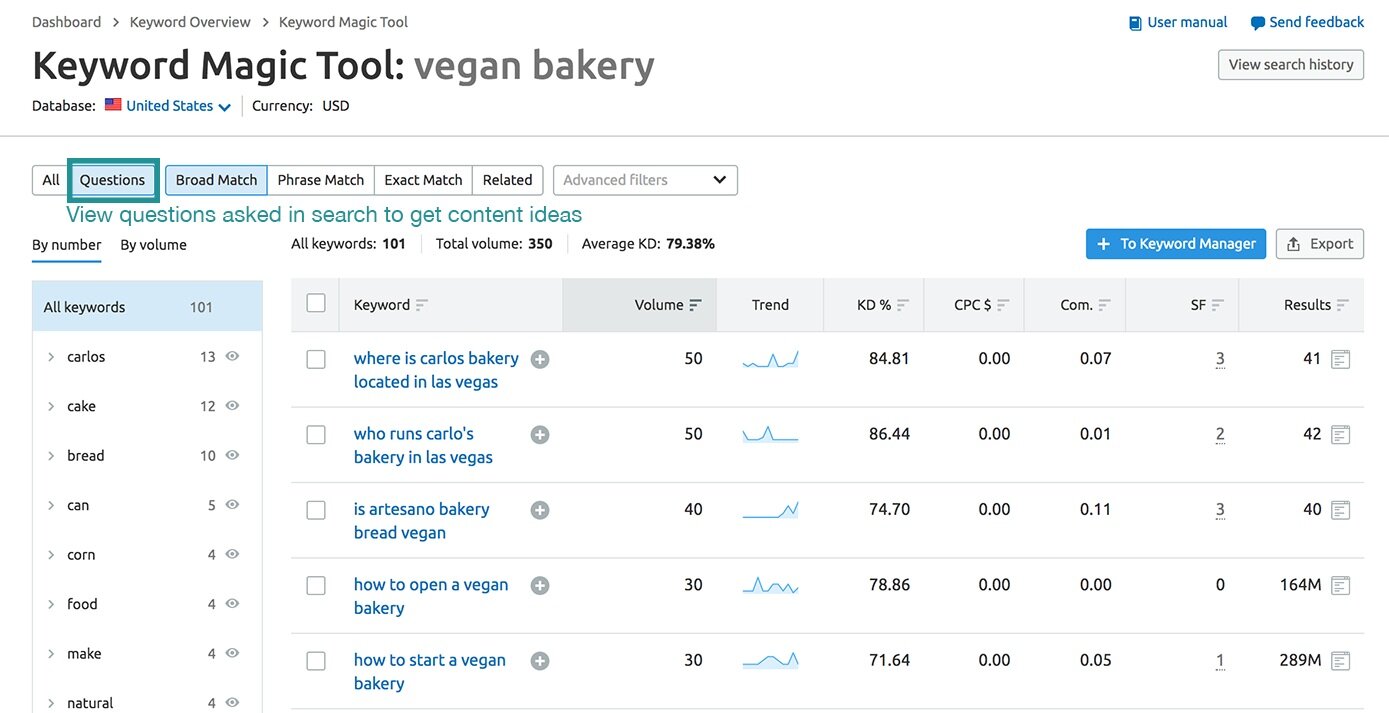
SEMrush has a ton of tools you can explore and use to help with your SEO efforts. One filter in the Keyword Magic Tool that might be useful for content ideas is the Questions filter on the left. Have you ever typed something into Google and had an answer box appear at the top of the results with a blurb pulled from a website? The reason that result is showing is because that website developed content that was designed specifically to answer your question.

Imagine if your website was the first to appear for the query “how to start a vegan bakery”. You can write a blog post that covers the steps you took to start your bakery, which not only gives you more opportunities to rank and gain more website traffic, but also tells a cool story to your customer base.
Tools for Building Authority
The second pillar of SEO is website authority. Your website’s authority is based on a number of factors, but one of these that you can easily improve is the number of backlinks to your site. These are instances where other websites link to your website, bringing you more traffic.
The best tool to use for building your website’s authority and gaining backlinks is a blogging platform for your new blog! People will want to link to your blog posts when you focus on sharing genuinely helpful content, especially if you use the feature in SEMrush listed above to find questions that your target audience is asking.
If you already have a website, chances are that you have the ability to add a blog to this website through your hosting service. If not, here are some blogging platforms that I would recommend.

Photo by Ilya Pavlov on Unsplash
Squarespace: This is the service that I use to host my website and blog. Squarespace is extremely easy to use but still provides you with the control to change the look and feel of your site. I love it because it’s affordable, but the layouts and templates available give a very polished look and feel.
Wordpress: Wordpress is the most popular blogging platform because it provides users with full control over all aspects of your website. There is a bit of a learning curve to use the software, so I wouldn’t recommend this platform to beginners. However, there are a ton of tutorials and forums for Wordpress users to help each other through issues and learn from each other.
Wix: Another easy-to-use platform, Wix is a drag-and-drop website builder that even offers a free plan (with Wix branding) if you’re on a tight budget. You can literally get a website and blog up and running in minutes using Wix.
Once you have a blog up and running, write some posts that will answer your customers’ questions. Unless your customers are seasoned journalists, editors, or English majors, don’t freak out about being a five-star copywriter just yet. As long as you’re truly creating value with your audience, they will love reading your blog! Then, reach out to other active bloggers in your industry to see if you can do a guest post on their blog. Make sure to insert a hyperlink to your website when you write your post for them.
Tools for the Technical Factors
We know that in order for search engines to show your website in search results, they need to have a catalog of all of your webpages. Indexing is when Google and other search engines crawl your website to do this. The easiest way to allow search engines to index your website is to submit a sitemap. This is a file that lists all of the content of your website, including landing pages, images, videos, and other files.If you use one of the website builders listed above, you should be able to look up how to submit your sitemap to search engines like Google and Bing. Here are the tools you will use to do this.
1. Google Search Console: This tool is extremely powerful in notifying you of any optimization errors on your website and how to fix them. Once you log in to your account, enter your website URL and click “Add Property”. You may be required to verify ownership of your website by placing a code in the header section of the website HTML. Again, check with your website platform for confirmation on how to do this. Once your website has been verified, submit your sitemap by entering your sitemap URL in the “Sitemap” section of the search console. This URL ends in “.xml”.

After a few days, Google will have your website indexed and ready to go. Visit the “Coverage” section on the left to check for any errors that would have caused your pages to not index.
2. Bing Webmaster Tools: Once your sitemap has been submitted to Google Search Console, it’s super easy to do the same for Bing. Visit Bing Webmaster Tools and simply connect it to your Google Search Console account. Done!
Tools to Track User Experience
We’ve already covered how to make your website more accessible to search engines’ crawlers. The last pillar of SEO is focused on user experience—making your website more accessible to humans. After all, a search engine’s number one goal is to provide results that humans will see the most value in.
Here is a valuable tool that will help you in the user experience realm of your SEO efforts.
1. Google Analytics: Aside from being able to provide valuable insights and demographics of your website visitors, Google Analytics can help you track certain metrics that can affect your SEO, such as:
Dwell time: Time a user spends viewing a page (In Google Analytics, this metric appears as “Session Duration”)
This should be as long as possible. A good average Session Duration is between 2-4 minutes.
Bounce rate: The percentage of users that enter your site then leave without visiting other pages
This should be as low as possible. A bounce rate between 26-40% is excellent.
Page load times: How long it takes for a page to fully load all images, videos, and other content
This should be as short as possible. Shoot for a page load time that is less than three seconds.
There are other websites that will test some of these metrics and go a bit more in depth. One example that I really like is GTmetrix, which tests the page load time of the URL you enter and provides recommendations on how to improve.
As you can see, there are a ton of tools out there that can help you with your SEO efforts. SEO is a huge concept, and I’ve only scratched the surface here. I’m excited to share more SEO tips for your small business in the next few months, so be sure to subscribe below!

THE Most Basic Introduction to Search Engine Optimization (SEO)
Search engine optimization (SEO) is one of the most complex and misunderstood topics in digital marketing. At its core, SEO aims to rank your website as one of the first organic search results on search engine results pages (SERPs). Search engines like Google are constantly updating their ranking algorithms, but there are things you can do NOW to help your website rank higher on SERPs.

Photo by Benjamin Dada on Unsplash
According to 99 Firms, nearly 93% of all web traffic comes through search engines. Search engine marketing has the potential to generate awareness of your brand among potential customers.
The two types of search engine marketing are paid search marketing (typically using Google Ads) and search engine optimization (SEO).
Interestingly enough, one statistic reported by SmallBizGenius states that 70-80% of internet searchers ignore paid search ads, making SEO a very powerful marketing tactic.
When done correctly, SEO has the potential to drastically increase your website traffic and, in turn, boost your conversion rates over time.
What is SEO?
If you’re a business owner that has never heard of the term “SEO” before, keep reading. If you’re a digital marketer, you may cringe at the mention of the term. It’s a subject that many marketers find difficult to fully understand.
At its core, SEO is the process of ranking your website to show first in the organic search results section of search engine results pages (SERPs). Scroll down to see an example SERP layout to see what I’m talking about.
In order to understand how to optimize your website for search engines, it’s important to first understand how results are ranked.
How do search engines rank results?
Simply put, search engines like Google or Bing aim to provide the best answer to search terms. Their main focus is user intent.
When you search for something in Google, the results page will look something like this:

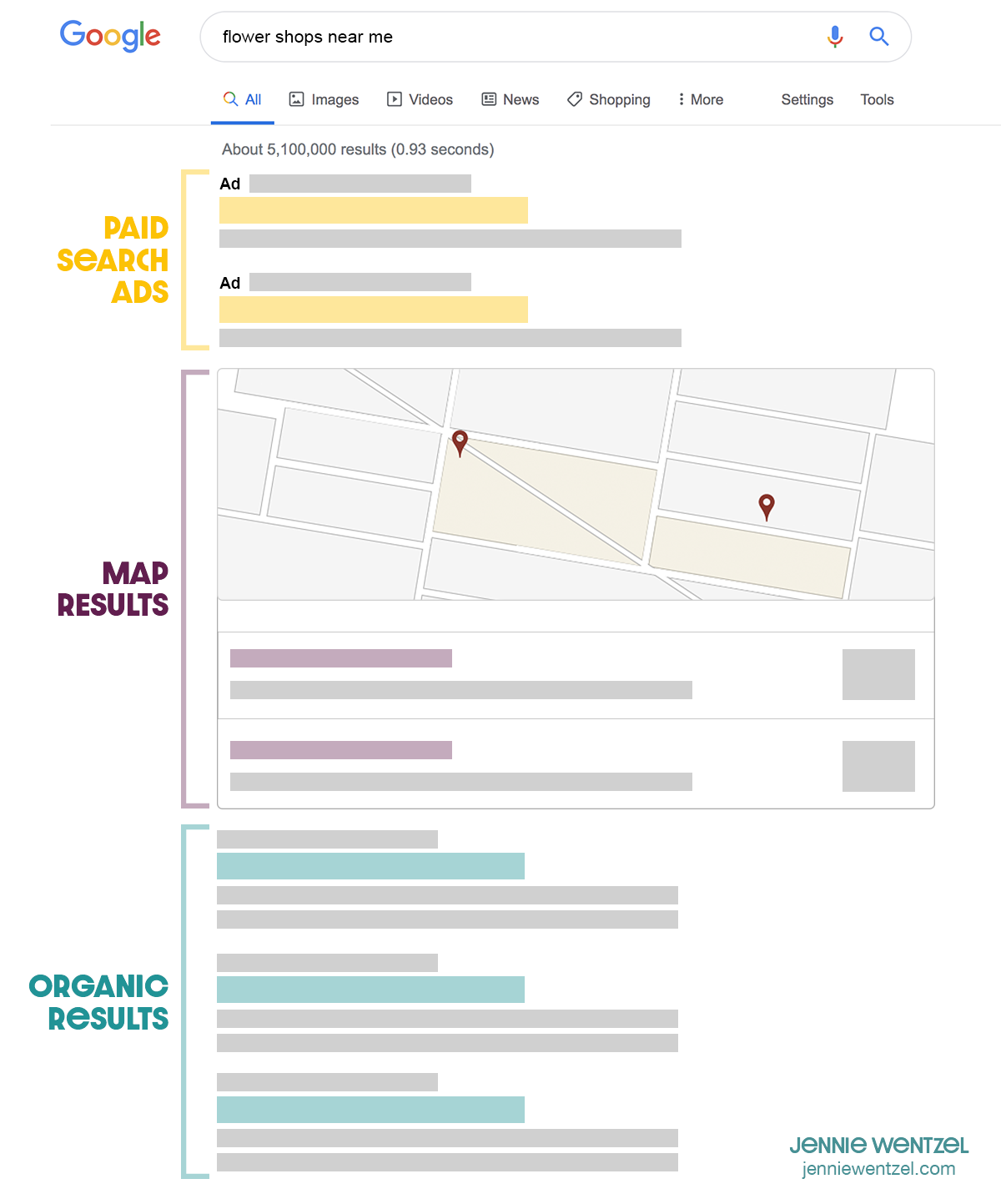
As you can see, there are paid advertisements that show up first. These ad spaces are purchased by companies that bid based on certain keywords. Right now, we’re more focused on the results that show after these spaces: organic results.
Search engines crawl websites for content and catalog the information to be used at a later time. Then, when a search query is entered, the search engine will display results and order them based on a number of factors. The list of these factors is very long and ever-changing, but they can really be summed up in four “pillars” of SEO, according to Leanne Wong:

Photo by Edho Pratama on Unsplash
Website / Page Content: When it comes to developing content for your website, the most important thing to remember is to create content based on user intent. This is more than just using keywords that you think potential customers will type into Google (which can help, but isn’t as important). Google will favor pages that it feels are most relevant and that answer the question that the searcher is asking. Additionally, it will use your website’s meta data, which are words and phrases found within the code of your website, to rank results.
Website Authority: Google ranks websites based on their authority. Authority is based on a number of things, but one way to boost it is through backlinks. A backlink is when another website links to yours organically. You can build backlinks by simply creating awesome content that people want to link to, or by doing a guest post on another blog and hyperlinking to your own website.
Technical Factors: This is where things get a bit more technical. There are a number of things you can do to ensure that Google can find your website in the first place. You need to make sure that Google can crawl your website by having a sitemap readily available. Also, make sure there aren’t any pages on your website that don’t have a link to them (these are called “orphaned pages”). Along the same vein, make sure your website contains no broken links, which are links that lead to pages that no longer exist.
User Experience: This pillar focuses more on making your website more appealing to humans, but is just as important. Things like page speed, bounce rates, and time spent on pages typically correlate with SEO performance.
If you’re feeling kind of lost on how to implement these recommendations, don’t sweat it! I have a great list of tools to help you improve your SEO here.
Hi! I’m Jennie.
Thank you for visiting my blog! I write about marketing tips for small businesses and how to succeed as a female professional. I write from experience about the things that I love.