

Blog

The RIGHT Way to Market Your Small Business on TikTok
TikTok has seen explosive growth in popularity over the last two years, and its primary users are the elusive yet highly-influential Gen Z-ers. If your small business is looking to connect with more of your Gen Z audience, you might benefit from developing a presence on TikTok. However, I wouldn’t recommend spending any money on the app at all… follow these tips instead.

Photo by Aaron Weiss on Unsplash
If Gen Z is part of your target audience, you may hear about the app TikTok in your market research. You might find out that TikTok is one of the fastest-growing social media platforms in the world, currently standing at over 800 million users worldwide.
What the heck is TikTok?
TikTok is a short-form video-sharing platform where users are encouraged to share stories in 60 seconds or less. Creators range from celebrities, influencers, artists, and more. Content on TikTok ranges from the funny to the weird and from the insightful to the heartwarming.
In 2017, the app merged with a lip-synching app called Musical.ly, so most videos that are shared are recorded over other videos’ sounds.


Creators can add text or use in-app filters on videos they record and share. Additionally, users can “duet” with other videos, which will show their own video alongside the original.
I could go on and on with what the app is like, but I encourage you to download it and do some research of your own to understand the types of videos that are on there. Be careful, because it can be addicting!
TikTok is most popular amongst Gen Z, with 41% of its users aged 16 to 24 years old. Gen Z is quickly becoming the most financially influential generation, so connecting with this audience now is more important than ever.

With all this in mind, you might be thinking about creating some paid ads on the platform to advertise your business. However, this is NOT what I would recommend in order to reach and engage with users on the app. The reason? It’s incredibly easy to ignore the ads and promoted content on the app. They stick out like a sore thumb and are disruptive in a bad way.
Here’s what you should ACTUALLY do…
First off, if you haven’t followed my advice and downloaded the app to explore, make sure you do so right now. Don’t feel silly; there are plenty of adults over the age of 25 (myself included) that have spent a decent amount of time on there. Even Gary Vaynerchuk has a profile (and he sees a lot of potential in it). Carve out some time to do the following:
Scroll down the “For You” page and like some videos.
Pay attention to the way certain sounds and visual effects are used.
Notice how easy it is to scroll past or skip ads in the app.
Follow accounts you like by tapping the + icon on the right side of the video.
Now, think about some ways that your brand can contribute to the content being shared on TikTok. Are there trending sounds or hashtags that you can participate in?
If you’re still feeling lost, here are some content ideas from brands that are doing it the RIGHT way.
(Pro tip: You’ll notice that most of these types of videos have been suggested in some of my previous posts on social media. Get the most out of your content by cross-posting these videos to multiple social media platforms!)
How-To Videos
Although I am located in Michigan, there is a cafe called Bagel & Deli Shop in Oxford, Ohio whose account I follow. Why? Because they share videos of how they make some of their locally-renowned bagel sandwiches on the app.
The videos are oddly satisfying to watch, and they make me wish I was in Ohio so I could try one of their sandwiches! I’m not the only one who feels this way either. This account first started posting content on April 17th, and as of today, they have around 37,000 followers!
What you can take away: Don’t expect to go viral in your first month, but the more helpful your content is, the more likely you are to gain a following. What is something you can teach a potential customer about what you do in less than 60 seconds?
Helpful Tips
After spending some time on TikTok, you’ll start to hear that certain sounds and songs are more popular than others. I recently came across the account of a chiropractor by the name of Dr. Jordan Estrada who has built a following by posting his own remixes to these popular songs. His videos include recommendations and stretches for people experiencing back pain, neck pain, headaches, and more.
Are his videos cringeworthy? Yes. Does he have almost 400,000 followers? He sure does! Also, people find his content to be genuinely helpful. Imagine coming across this account and realizing that Dr. Jordan practices in your area. You would probably be calling his office for an appointment!
What you can take away: I wouldn’t recommend posting your own remixes of songs on TikTok, but you can follow Dr. Jordan’s lead by sharing helpful information and sharing your expertise. This will create trust in your brand and your services.
Demo Videos
Never underestimate the power of a demonstration video! Have you ever found your eyes glued to the screen of a “How it’s Made” video? What about a video showing how to use a cool product?
This account belongs to someone that sells customized water bottles, mugs, and more. Their videos have a ton of views, and if you look at the comments, there are a lot of interested potential customers too!
What you can take away: People that are scrolling through TikTok are looking to be entertained, and learning something new in the process is just a bonus. Play on both of these things by showing a video of your product in action, or by showing your process in creating something behind the scenes. Make sure to use the hashtag #oddlystatisfying to target the right kind of audience!
Influencer Marketing
I touched on influencer and micro-influencer marketing in my previous post about marketing to Gen Z, and those types of videos have a place on TikTok too.
Believe it or not, this dog is an influencer on TikTok! With over 5 million followers, Tucker the Golden Retriever brings joy to his followers with hilariously cute “review” videos. Influencers like Tucker have the power to introduce your product or service to a much larger audience.
What you can take away: Identify influencers or micro-influencers related to your industry. Reach out and see if they would demo your product and what their rates are. If influencer marketing is way out of budget, brainstorm ways to develop a product or service that people genuinely want to talk about on their own. Are there people out there promoting your brand already? Give them more of a voice.
What’s great about TikTok is that you can use it as a sort of “test kitchen” to play around with different forms of content to see what works and what doesn’t. By focusing on entertaining and informing your viewers, you’ll create a strong following of potential customers and ambassadors that trust your brand.
![[Infographic] The Small Business Guide to Google Analytics](https://images.squarespace-cdn.com/content/v1/523cf6c4e4b0f6b279e835d3/1588538232718-QARIF3QRPOEKPHIHGXRZ/google-analytics-post.jpg)
[Infographic] The Small Business Guide to Google Analytics
What role does your website play in attracting and converting new customers? If you’re not sure, you should check your Google Analytics dashboard to get a pulse of who is coming to your website, where they are coming from, what they are doing on your website, and more. Here are some tips for small business owners on how to use GA to reach their digital marketing goals.
Photo by Campaign Creators on Unsplash
Picture this: you’ve noticed that you’re having a hard time attracting new customers lately. You’ve been able to identify that the problem probably lies in your website, so you decide to make some adjustments. Where do you start, though?
There is almost nothing worse than blindly making changes to your website without concrete data to back those changes up. Do you know what’s working well already and driving conversions? Do you know who exactly is visiting your website? Do you know how they’re even finding your website?
Enter Google Analytics, one of the most powerful tools out there to help you answer these questions. The best part? The tool is 100% free and easier to set up and use than you might think.
Why Use Google Analytics?
First, let’s specify exactly why it’s so important for you to keep tabs on your Google Analytics (GA) metrics. GA can provide some valuable insights on three main categories of your small business’ marketing:
Your customers / website visitors
Your website performance
Your industry benchmarks
You may already have an idea of the demographics of your target audience, but does this match the demographic of your website visitors? GA can help you see if it’s all adding up.
We also know that certain aspects of your website are important to keep an eye on to monitor your search engine optimization (SEO) efforts.

GA can also provide some great insights on analytic benchmarks in your industry. Things like average session duration and bounce rates in your industry are made available to help you understand how you rank amongst your local competitors.
All of these different metrics can help you understand the role that your website plays in converting new customers, and provides actionable data to help you make changes as needed.

How to Set Up Google Analytics
If you don’t have GA connected to your website yet, here is a quick run-through of how to do so.
Start by visiting the Google Analytics homepage and logging in to your account. You will then be asked to enter your website name and URL.
To verify that you are the owner of your website, Google will ask you to install a tracking code in the source code of your website. The steps to do this all depend on your website platform and where the code of your website is located.
Once the tracking code has been installed, you will see your analytics data start to populate!
Another helpful step to follow once you’re set up is excluding your IP address(es) from your analytics view. This allows you to see only the data from real website visitors and not just yourself or your employees.
To do this, scroll down to “Admin” in the bottom left corner of your dashboard. Under the “View” section all the way to the right, click on “Filters”.
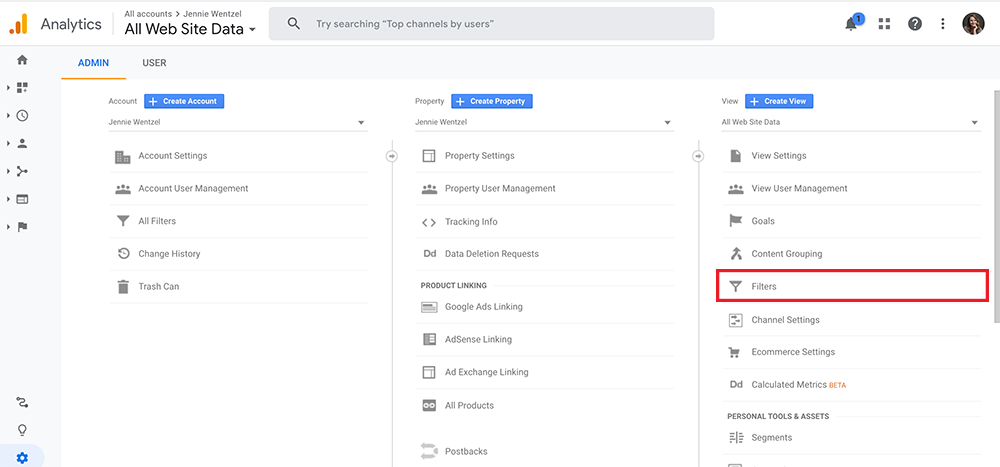
You will make a filter for each IP address you want to exclude from your data. Click to add a new filter for your first IP address. Make sure the following information matches this screenshot:
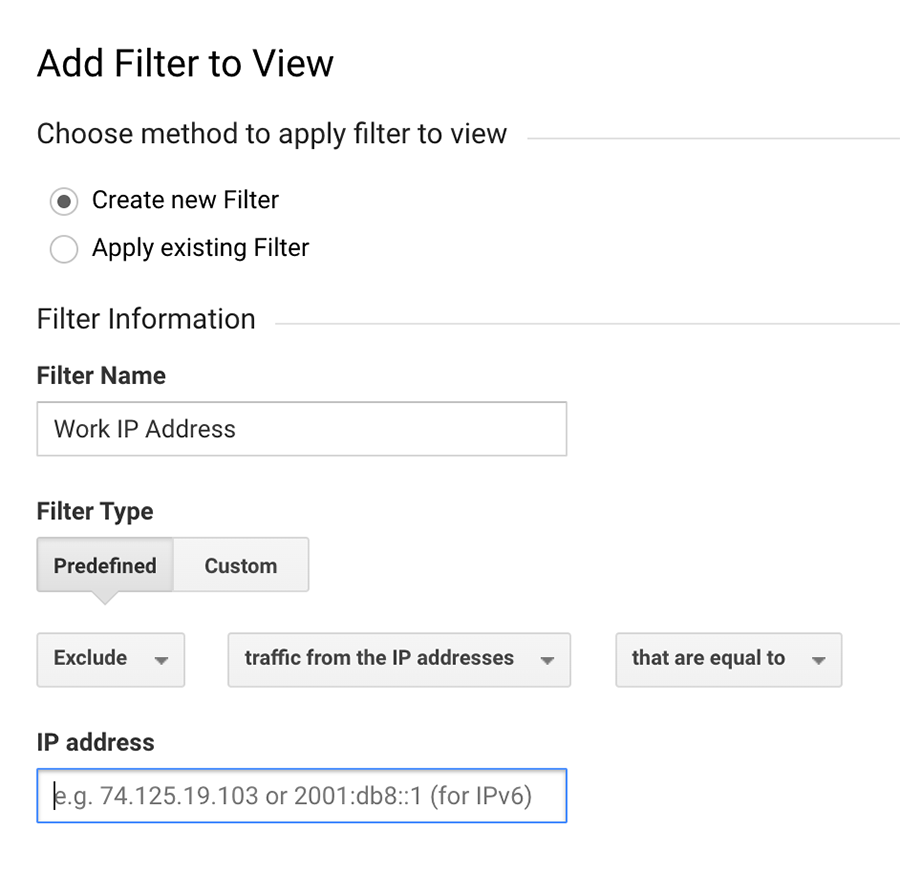
Filter Name: Make this something you will remember, such as “Work IP Address”
Filter Type: Select “Predefined”
Then select “Exclude”, “traffic from the IP addresses”, and “that are equal to”.
Then, enter the IP address. If you’re not sure what your IP address is, just type into Google “what is my IP” and copy that number.
Click “Save” and repeat this process for every IP address that you want to exclude. Now your data in Google Analytics won’t be skewed!
Metrics to Track in Google Analytics
Looking at the GA dashboard for the first time can be a little overwhelming. Here are my recommendations for the most important metrics to view and track in your website’s Google Analytics reports.
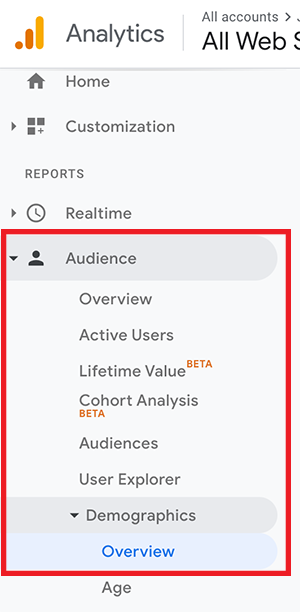
1. Visitor Demographics
In the “Audience” tab on the left, scroll down to “Demographics”, then “Overview”. You may or may not have some data here, depending on if this feature is enabled for you or not. Feel free to enable it and check back later to keep tabs on the demographics of your website visitors. If these demographics don’t seem to match your typical target audience, it might mean that you need to make some changes to your website to attract more of those target visitors. It could also mean that you need to make some modifications to your business model to cater to your current visitors, too.
2. Average Session Duration
This metric can be found in the “Audience” tab as well, right in the “Overview” section. Average session duration will help you know if your website content is serving the needs of your visitors. The longer the session duration, the more likely it is that your website is engaging enough to keep your visitors around. This metric can also impact your website’s SEO. A good rule of thumb is to shoot for an average session duration of 2-4 minutes.

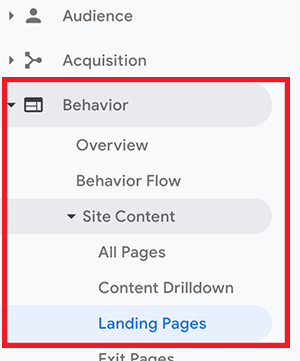
To drill down and view session duration on a page-by-page basis, visit “Behavior” (we’re looking for the section nested outside of the “Audience” category), “Site Content”, “Landing Pages”. This will show which pages have a longer session duration and which ones might need to be changed.
3. Bounce Rate
This metric can be found right next to your “Average Session Duration” in “Audience” > “Overview”. When a user visits your website and then exits without clicking on other pages, this is known as a “bounce”. This basically means that they didn’t find what they were looking for when they clicked on your site. Having high bounce rates can negatively affect your website’s SEO, since this tells search engines that users aren’t finding answers that they need on your website.
If you have a bounce rate higher than 50%, try to identify problem pages by going to “Behavior”, “Site Content”, then “Landing Pages” to view bounce rates on a page-by-page basis.
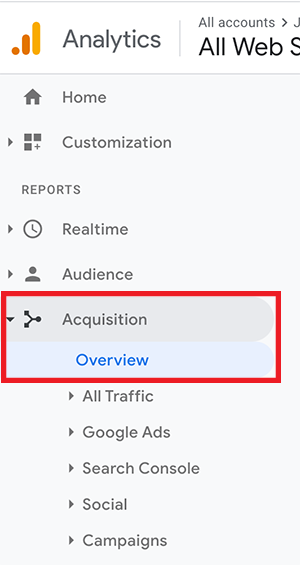
4. Acquisition
It’s important to understand how visitors are getting to your website, and the “Acquisition” section will help you with this. In the “Overview” tab, you’ll find a breakdown of which channels your visitors are getting to your website from. This section will provide some important insights on the success of your social media posts (“Social”), backlink creation strategy (“Referral”), and SEO efforts (“Organic Search”).
5. Page Load Times
Yet another metric that affects SEO, it’s important to keep your page load times below three seconds. To check, go to “Behavior”, “Site Speed”, then “Overview”.
If you’d like page-by-page suggestions, view individual load times by clicking “Page Timings” just below “Overview”. Enter the URL of any slower pages into GTMetrix to get actionable suggestions to help improve that page’s load time.

6. Benchmarking
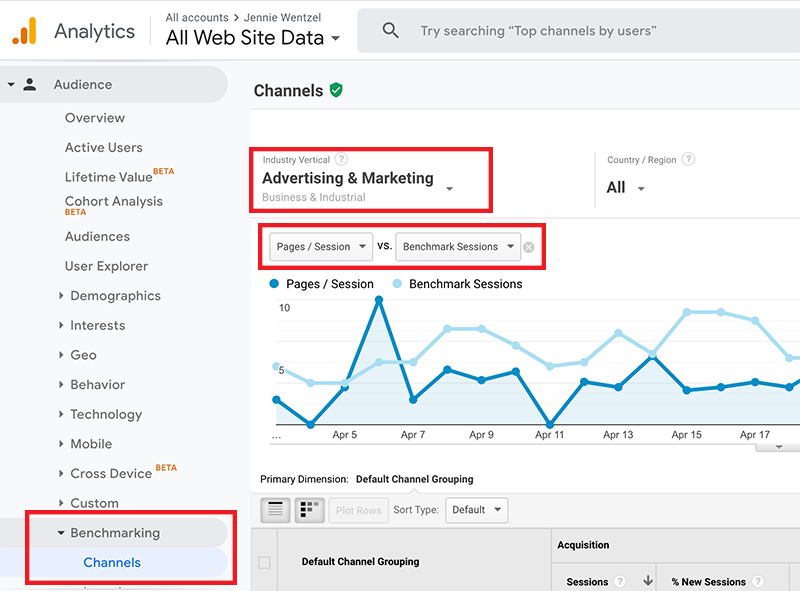
Depending on your industry, this section can be very insightful. You will find the “Benchmarking” section in the “Audience” tab on the left. In any of the sections, you can change your Industry Vertical and Metric Dimensions at the top. Take a look at the graph as well as the charts below to see how you stack up against your competition!
Now that you have a better idea of some important metrics to track in GA, do some exploration of your own. The more familiar you become with it, the more informed decisions you can make about improving your website!
Check out the infographic below for future reference.
![[Free Template] How Your Small Business Can Implement Email Drip Campaigns](https://images.squarespace-cdn.com/content/v1/523cf6c4e4b0f6b279e835d3/1588272094110-HQ12VJTFVQ0LHHEUMX3I/free-small-business-drip-campaign-template.jpg)
[Free Template] How Your Small Business Can Implement Email Drip Campaigns
If you’re looking for a way to use email to build stronger customer relationships and drive up to 24x more revenue for your small business, you should consider implementing email drip campaigns. These powerful, automated campaigns can be used to onboard new customers or re-engage with previous customers. I have also included a free drip campaign template for customer re-engagement.
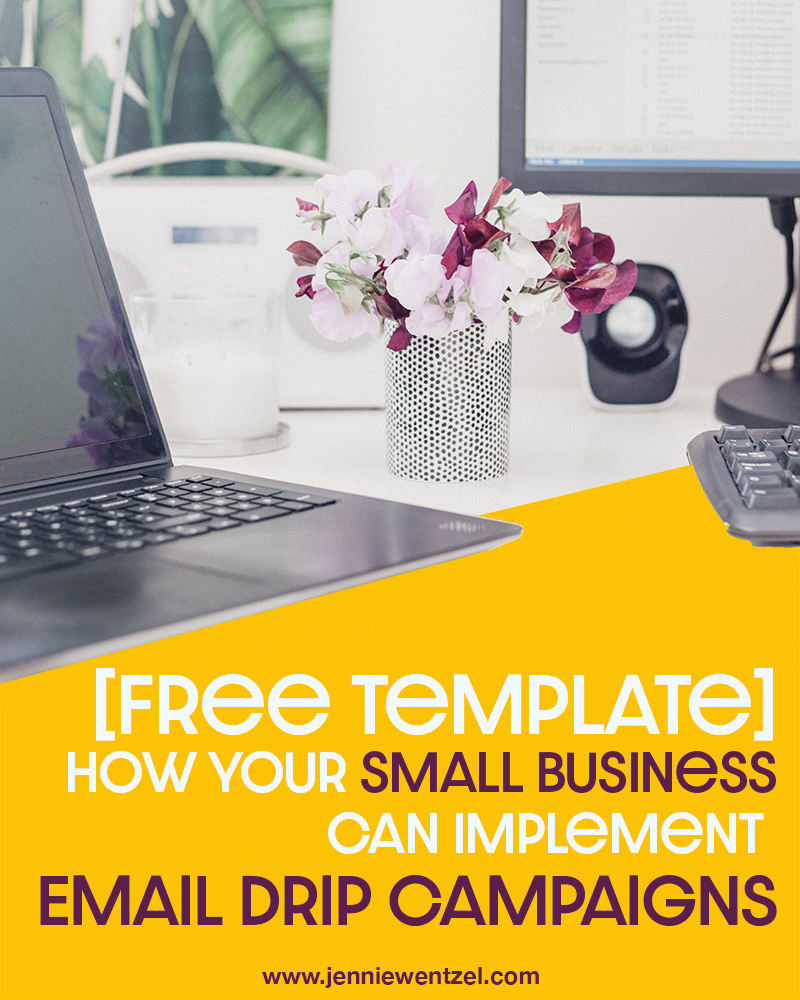
Photo by Georgia de Lotz on Unsplash
When someone gives you their email address, are you adding them to your general newsletter list, or putting them into a campaign based on their relationship with your brand? How are you converting them into loyal customers?
If you’re not sure, or are just adding them to your general email list, keep reading. We’ll introduce one way to further solidify your brand’s relationship with that customer or potential customer, also known as a prospect.
We’ve already discussed some best practices on building, segmenting, and nurturing your small business’ email lists. One way to nurture your prospects is to implement an email drip campaign.
What is a drip campaign?
A drip campaign is a timed series of automated emails sent to a prospective customer that are designed to convert them into customers. Think of it like slowly “dripping” information to them to gradually warm the lead up to your brand by creating trust. Rather than being salesy or assumptive right off the bat, they are designed to inform, educate, and bring value.
If the thought of “automated emails” sounds out of your budget, consider this: automated trigger emails have the potential to drive 24x more revenue than “batch and blast” emails, according to BounceX. This is because these emails are more tailored to the experience of that particular customer.
You should consider a drip campaign for your small business if you want to get the most out of your email marketing strategy. When done right, these types of campaigns are an easy way to boost email engagement, website traffic, and, ultimately, sales.
If you don’t currently use an email platform with automated capability, do some research on pricing. Platforms like Mailchimp, HubSpot, and Drip are affordable options with this capability. If you still feel these are out of budget, you can do a manual drip campaign by keeping track of who is getting the emails you’re sending and when.

How do I implement a drip campaign?
Here are the questions you should answer to create your first drip campaign.
1. What is the goal? Are you trying to promote a new product, service, or event? Do you want to re-engage with previous customers? Do you want to win over new customers? As always, make sure this goal is specific, measurable, and attainable.
2. How will you get the emails? A better question is: what will you give your prospects in return for their email address? This could be from a free content offer on your website, a giveaway on your social media, or from a sign-up sheet at an event. You can also develop a drip campaign that is designed to turn your blog subscribers into customers.
3. How many emails will you send, and how often? You don’t want to send each email too often, as that can come off as spammy. A good place to start is to send an email once a week. You will also need to decide how many emails are in your drip campaign. This number might become more clear once you write the content, but shoot for a number between 4 and 10 to start.
4. What will your emails say? Keeping in mind that your goal is to develop a relationship with the prospect, write your emails as if they were coming directly from you (or one of your salespeople). Scroll to the bottom of this post for a free template to get some ideas. Also, make sure every email you write has a call-to-action that you’d like the recipient to do so that you can answer...
5. How will you remove people from the campaign? One reason you want a call-to-action in every email is so you can understand which recipients you have won over. These people should be removed from your drip campaign once this has been determined. That way, you’re not continuing to send them emails asking them to take an action that they’ve already taken, such as testing out your new product.
Free Template: Sample Customer Re-Engagement Campaign
Here is a sample re-engagement drip campaign that you can repurpose for your small business! Check out the diagram below to see the workflow of this email series.

Email #1: Warm Introduction
Subject: Thank you again for your support!
Hi [Previous Customer],
I just wanted to take the time to reintroduce myself. My name is Maria and I am the owner of Maria’s Events & Gifts.
I wanted to thank you for shopping with us this past [month]. As a small business, each and every purchase helps us to continue supporting and thriving in the [city/town] community.
I hope you continue to think of Maria’s Events & Gifts for your event needs. And with Mother’s Day quickly approaching, we just added some very unique and creative gifts to both our retail and online stores.
Please feel free to give us a call at [phone number], or visit our website at [website] to view our newest gifts and supplies.
Take care!
Maria
Email #2: Cool Resource
Subject: Here’s a little something extra for you!

Photo by John Schnobrich on Unsplash
Hi [Previous Customer],
I hope you’re doing well and enjoying the spring weather!
Since my last email, we added a new post to our blog that I think you might find helpful in your gift search. We’ve listed the top 10 most unique gifts this spring, and they’re great for the whole family!
My personal favorite is this new board game called “The Chameleon”. My friends and I had a blast playing it the other night.
Anyway, I hope you have a fabulous weekend. As always, please give us a call at [phone number], or check out our other blog posts and products on our website!
Best wishes,
Maria
Email #3: Case Study / Testimonial
Subject: Don’t just take it from me...
Hey there [Previous Customer],
Do you have any big events planned for this summer? I’m sure you’ve made the connection, but Maria’s Events & Gifts offers affordable event planning services too!
I started Maria’s Events & Gifts in 2014, with the mission to provide our community with affordable event planning services so that they could focus on the most important part: spending quality time with their family and friends. Event planning is my passion, and I would love to share what I’ve learned with you!
I could go on and on about what we can offer, but I thought you might want to hear from one of our previous customers. Here is a little testimonial from our dear customer Rhonda:
“I wanted to plan a fabulous retirement party for my mother, but I was on a tight budget. I was so glad to have found Maria at Maria’s Events & Gifts! What I loved was that Maria was just as dedicated to staying under budget as I was, but she had some amazing ideas to make my mom’s party an absolute bash!”
If you’re planning an event, please give us a call at [phone number], or fill out the contact form on our website at [website]. Let’s make it an event to remember!
All the best,
Maria
Email #4: Special Offer
Subject: A gift just for you!
Hi [Previous Customer]!
I hope you have been enjoying the emails I’ve been sending over the past few weeks!
As a thank you for your time, I’m giving you a special offer: 30% off any regular-priced gift in our store. You can use this on our website by entering the code, or come visit us in the store and show us this email to redeem your offer.
Code: THX30
Whether you have an event to plan or attend, I hope you keep Maria’s Events & Gifts in mind for your supplies, planning, and gifts.
Please always feel free to reach out to us at [phone number].
Thanks again, and have a great weekend!
Maria

Five Marketing Strategies to Help You Reach and Engage with Your Gen Z Audience
Generation Z, currently defined as those born in 1997 or later, is quickly becoming the most financially influential generation ever. If your small business is looking for more ways to reach this type of audience, it’s important to first understand exactly what makes this age group so unique, and how to best resonate with them.

Photo by Laura Chouette on Unsplash
Generation Z, defined by Statistica as those born in 1997 or later, is the largest generation in the US, making up over 90 million of the population. This group is on track to become the most financially influential generation ever.
Gen Z already has an estimated purchasing power of $44 billion per year, which means now is the time for small businesses to adjust to this group’s behaviors and values in their marketing strategies.
However, it’s important to understand what makes Gen Z-ers unique. As the first generation that was born into this digital age, Gen Z is excellent at shutting out the more traditional, disruptive advertisements that offer them no value or personalized experience.
In general, this group of consumers seem to be much more responsive to:
Genuine reviews from experts or influencers
Personalized ads and experiences
New, interesting, and up-to-date content
Corporate social responsibility
Connectedness (both in-person and digitally)
With this in mind, here are some strategies that your small business can utilize to help you reach a Gen Z audience.
Influencer Marketing
According to a report by Morning Consult, nearly 75% of Gen Z-ers follow at least one influencer on social media. An influencer is loosely defined as anyone with a large following that can, obviously, influence the decisions of that following.
Have you ever seen a YouTube makeup artist do a special unboxing or demo video of a package of product sent to them by a major brand? What about an Instagram post spotlighting a product with the hashtag “#ad” in the caption? These are examples of influencer marketing.
As a small business, you might think that influencer marketing is way out of your budget; this simply isn’t true. You can identify micro-influencers who have a smaller following of people more related to your industry or product to create ads that are much more organic and appealing to your Gen Z audience, who appreciate more personalized and genuine content anyway.
Personalized Communication
Speaking of personalization, this is something to keep in mind when creating content for Gen Z consumers. According to Mobile Marketer, Gen Z prefers to see online ads and communication based on their browsing history.
This might open up the idea of remarketing through Google Ads or another platform, but remember that this generation has been looking at online ads almost their entire life already and have gotten really good at ignoring them.
To cater to Gen Z’s personalization preference, use it as much as possible in email marketing and other communications. Rather than send a newsletter with a list of new products, send a coupon code for a recently viewed item, or spotlight an item related to one that was already purchased.
Video Marketing
What do YouTube, Instagram, and TikTok all have in common? They’re not only three of the most popular social media platforms for Gen Z users, they are primarily video-sharing platforms. Video is a great way to not only grab the attention of your Gen Z audience, but also quickly and effectively communicate with them before they move on to the next thing.
Your small business doesn’t need expensive equipment to start creating video content, either. Even a video shot on a smartphone can get your message across—just make sure you have some sort of tripod or stand to hold it in place.
Create videos that explain your product or service, show customer testimonials, or that simply tell a great story. Don’t be shy—get in front of the camera and tell people how your business can help them.

Photo by Louis Hansel @shotsoflouis on Unsplash
Social Responsibility
Experts report that corporate social responsibility (CSR) is huge for both Millennials and Gen Z. As Sarah Cavill writes for Digital Media Solutions:
Gen Z, in particular, looks at the world with a side-eye stemming from having grown up amid recessions, fractured politics and often unexpected job transitions for their Gen X parents, leading to decreased trust in businesses.
If you’re looking for more ways to appeal to potential Gen Z customers, consider implementing a CSR program for your small business that aligns with your vision. Choose a cause that you or your staff are passionate about, and find ways to contribute and/or bring awareness to that cause that incorporates your mission, products, customers, and employees.
Still not sure where to start? Your cause could be as simple as sourcing your materials or supplies from other local or sustainable businesses. What are other changes you can make to your business model that support this cause? Are there any hands-on opportunities to volunteer with your staff? Is there a way to donate a portion of your sales to this cause?
Once you have that sorted out, make sure to communicate this with your customer base in a variety of ways. Make it clear to all potential customers—not just the Gen Z-ers— that by supporting your business, they are also supporting this cause.
Social Media Marketing
Unsurprisingly, out of all the other generations, Gen Z spends the most time on social media—two hours and 55 minutes each day, on average. This makes social media a great way to reach this age group. However, keep in mind that they’re not logging on to social media with the intention to connect with brands, but to connect with friends, peers, or just for entertainment. This means that your small business’ approach on social media should be less purchase-driven and more focused on one or more of the previously mentioned strategies.
If we know anything about Generation Z, it’s that they can see right past the forced, synthetic messaging that comes with traditional marketing tactics. As children of the digital age, they have the ability to ignore so many types of advertising. One thing to keep in mind when marketing to this very influential age group is to be as genuine, personable, and non-disruptive as possible.
![[Infographic] Four Marketing Metrics to Track During (and After) a Global Crisis](https://images.squarespace-cdn.com/content/v1/523cf6c4e4b0f6b279e835d3/1587670534696-EE2UH458S0T132UBALVI/engagement-metrics.jpg)
[Infographic] Four Marketing Metrics to Track During (and After) a Global Crisis
COVID-19 isn’t just a global pandemic; it is an economic crisis for small businesses. As we work to flatten the curve of cases in the US, so begins the transition to our “new normal”. If you’re a small business, here are four marketing metrics that I would recommend you start monitoring now in order to help you understand where your marketing budget should be.

The coronavirus pandemic has changed the way many small businesses have had to operate over the last month or so. Although there is discussion of some local governments lifting stay-at-home orders soon in order to improve their economies, we will be seeing the effects of this crisis for quite some time.
This “new normal” will be much different from the way things were before. Many small businesses will feel the need to cut back on costs, and may look to marketing costs firsts. As a marketer, this breaks my heart, because as my favorite quote by Henry Ford says:
Stopping your advertising to save money is like stopping your watch to save time.
Nonetheless, your marketing budget will need to change. Here are some metrics that you should start tracking now to help you understand how to evolve your marketing budget in this “new normal”.
Change in Customer Lifetime Value
Customer lifetime value (CLV) is the total amount of money that a customer is expected to spend with your business during their lifetime. CLV can be calculated in different ways based on the type of small business you own, but the basic formula is:
[average value of a purchase] X [number of purchases from a customer per year] X [length of customer relationship in years]
If you have seen a drastic decrease in business from repeat customers, your CLV has probably decreased as well. For example, if you own a small coffee shop, and your regular customers have been coming in less frequently because they are working from home, the average amount of money they spent with you has gone down.
The specific metric you should identify here is the change in CLV that you have seen since the pandemic started affecting our country. This will help you determine how much money you should be spending to acquire new customers (which we will talk about in the next section).
To Track: Use sales numbers from before the year 2020 to see what your CLV was pre-COVID-19. Then calculate CLV using sales numbers from this year to compare the change. As local shelter-in-place mandates are lifted, it would be a good idea to contine tracking this metric as your local economy opens back up.
Change in Customer Acquisition Cost
Customer acquisition cost (CAC) is how much it costs your business to acquire a new customer. This is calculated by by adding up all of the marketing and sales costs associated with earning new customers (or converting existing customers into repeat customers) and dividing that number by the total number of customers won over from those efforts. Here is the formula written out more clearly:
[total amount spent on marketing and sales] / [number of customers won from those efforts]
Again, in the midst of this pandemic, we want to track the change in CAC. When you compare this number to the change in customer lifetime value, you will be able to effectively determine how much money (and time) you should be spending on your marketing efforts to attract new customers.
Going back to the coffee shop example, if your CLV has dropped from $250 to $150, you want to make sure that your CAC hasn’t increased to above that number. So if a $150 Google Ads campaign doesn’t bring you any customers, it’s time to reduce that budget, or look for other ways to spend that money that will be more effective—like SEO!
To Track: First, track all of the hours spent on marketing, as well as the costs associated with that time. Add it to any other marketing costs—think ads on Google or social media, email marketing platforms, etc.—and divide that number by how many customers were won over from those efforts. If you’re not sure, give your best guess based on conversations you or your staff has had with new customers.
Recalculate this number any time you calculate your CLV. These two metrics go hand-in-hand when it comes to developing your marketing budget.
Social Media Engagement
Predictions show that more people are spending time on social media while staying at home, which is why it’s so important to continue communicating with your customers on social.
With this in mind, make sure to keep an eye on your social media engagement. Social engagement is defined as shares, likes, and comments on your posts on social media. This is a great way to measure the success of your social media efforts, even if sales are down. The focus here should be on building and maintaining a relationship with your audience so that when they’re in a better position to buy, your brand will be at the top of their mind.
Nancy Kapoor writes for Social Media Today that interactive content as a digital marketing strategy will skyrocket this year. That’s because interactive content like 360-degree videos, quizzes, and polls are, by nature, a call-to-action. Interactive posts on social media can not only be shoppable, but shareable as well.

Photo by ROBIN WORRALL on Unsplash
To Track: Individually track engagement metrics on each platform that your small business is active on. Additionally, don’t forget about what your goals are for each platform. For example, if you are posting on Instagram to increase awareness from users between the ages of 25-34, don’t roll those engagement numbers in with those of your Facebook posts, where you might be trying to reach a different type of audience.
Stay agile. Find which type of posts are more successful and which ones have lower engagement rates.
Email Opens & Clicks
In March consumers saw a spike in emails sent from all kinds of brands making statements about how they were handling concerns about the pandemic. Most people found this to be kind of annoying.

Unsurprisingly, Salesloft reported that sales emails with “COVID-19” or “Coronavirus” in the subject line saw a 40% reduction in reply rates.
With this in mind, you may be thinking that email is a no-go right now. However, just like social media, email has the potential to help you create a much stronger relationship with your customer base (if you do it with the right intentions). Here are my three best recommendations:
Don’t try to incite fear.
Be positive, but...
...don’t be ignorant.
To Track: If you’re still sending marketing emails at this time, it’s important to keep a close eye on the open rates and click-through rates of your emails. If you’re seeing a significant drop in these metrics from before, you might want to think about changing up the content or just taking a break for a few weeks. Otherwise, you may see your unsubscribe rates shoot up, and those are contacts you may not be able to win over again.

As the economy starts to open back up in your area over the next few months and you adjust to your “new normal”, I hope you use these metrics to make re-budgeting less daunting and easier to understand on the marketing front.
If you’re a small business wondering where to go next, I’m happy to provide a free 30-minute consultation to talk about your goals and develop a plan of attack. Fill out the form below to sign up!
Hi! I’m Jennie.
Thank you for visiting my blog! I write about marketing tips for small businesses and how to succeed as a female professional. I write from experience about the things that I love.